

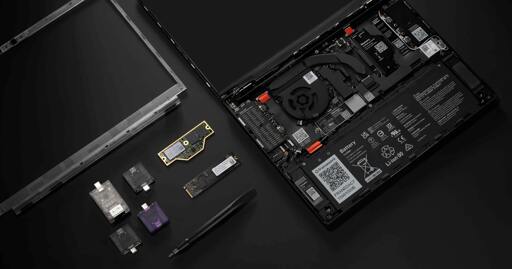
Framework announced the Framework 13 Pro including full Linux support right from the beginning.
Some quick information about the Device:
- will use Intel Core Ultra 300 (Panther-Lake)
- updated Battery Design with (up to) 20h Battery life
- custom designed Display Panel with Touch support (keeping the 3:2 aspect ratio)
- LPCAMM2 for upgradable/replacable RAM without compromising on Speed/Low Power of LPDDR5X
- milled Aluminium Unibody chassis
- Full Linux support right from the start (including Firmware update via LVFS, Fingerprint Reader, etc.)
- Haptic Touchpad
- and all the repairability features Framework is known for
You can watch their YouTube Video for a quick summary:
- YouTube: https://www.youtube.com/watch?v=GnOpIQJnYWU
- Invidious: https://inv.nadeko.net/watch?__goaway_challenge=js-refresh&__goaway_id=5a21ef489cbc0e9e48ccded2c92f2b68&__goaway_referer=https%3A%2F%2Finv.nadeko.net%2F&v=GnOpIQJnYWU
I was looking for a new laptop to replace my old Lenovo Yoga 370 and initially disregarded the Framework 13 because of some downsides (low Battery Life, bad Camera, etc.) and was looking to go with one of the following devices:
- HP Elitebook X g1a
- the new Dell XPS 14
- Asus Expertbook PM5 G2
or also a MacBook pro. I am using Linux since more then 10 years and never touched MacOS at all. So I was not sure if MacOS would work for me. But this announcement made it easy: It will be a Framework 13 Pro with Intel X7 358H!
I wonder how its touchscreen will be or is on their available laptops and does it support drawing with a tap like ipad or any other android tablet does? My friend has a surface laptop, its hardware is very good from what i know, it also has its own pen and it has pen pressure, the only problem is the screen, whenever i tried to draw on it the screen would shake and i was afraid i was going to break it. I wonder is that a surface laptop problem or a problem with all laptops that support this feature