

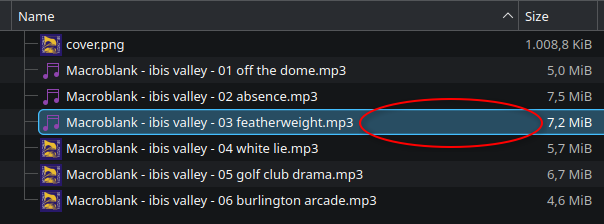
i want to be able to delete a file without having to select it first with LMB. this is because i can only select it with RMB when i click on the file name, whereas i am able to select the file with LMB even in the empty space after the filename.
this may not look like an issue in this example but i have a lot of files that are only 3 characters long plus file extension so most of the line is empty space. furthermore i don’t understand why the behavior is different in the first place.
is there a setting for this?
edit: dolphin v25.12.3
Detail view is probably different from list view, you should check
these are my view settings, not sure where to change to list view
also found this:
so it is a special setting to open files anywhere… not looking good for RMB (but it explains why it is different from LMB)
The view mode, but never mind you found the option for this behaviour
there’s no list option for me…
I guess they are thinking about the ‘Compact’ option
Yeah I was thinking it would shrink the clickable area.
I haven’t used dolphin in forever though, I’m probably past being helpful
compact just gets rid of the empty space