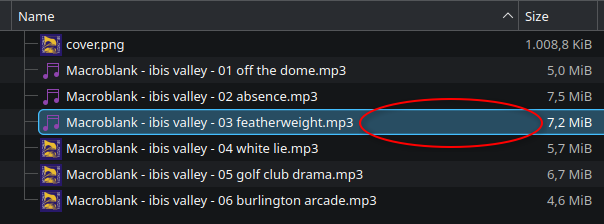
i want to be able to delete a file without having to select it first with LMB. this is because i can only select it with RMB when i click on the file name, whereas i am able to select the file with LMB even in the empty space after the filename.
this may not look like an issue in this example but i have a lot of files that are only 3 characters long plus file extension so most of the line is empty space. furthermore i don’t understand why the behavior is different in the first place.
is there a setting for this?
edit: dolphin v25.12.3
I can’t believe someone has the same nitpicking problem as me. It has been bugging me for a while now.
I’m not sure, but I’m shocked to see a fellow Macroblank fan out in the wild! I was pleasantly punked into listening to what I expected to be a sick metal album many years ago and instantly became a fan hahaha.
remember: “everything is plundered”
https://barbercut.bandcamp.com/
I’m confused - just tested this on my Dolphin and I can right click anywhere (including blank areas and other columns) in the row in Detailed mode, and with or without expandable folders on. I don’t need to select it first with LMB. Also if I right click, close the menu and scroll with scroll wheel I can even select multiple items.
I’m using version 26.04.3, and KDE Plasma 6.7.3.
thanks, i am on v25.12.3 but no update in discover (distro = kubuntu). so maybe it’ll be fixed at some point in the future for me…
Well just FYI, you could enable the Kubuntu backports to move to the latest version of KDE and it’s software?
EDIT: Nm, looks like the version in the backports is from 2025
In my understanding they put the event in the label containing the file name and not on the row item itself. At least for RMB.
So there is most probably nothing you can do but open an issue on bug tracker and ask for a new feature. Probably though there are technical reasons behind that choice and not just random choice.
but it’s working fine (and i guess as intended) with LMB (even in the empty space). and that’s how it works in windows explorer but it also works with RMB on there.
I believe, they chose a different behaviour for RMB, because otherwise you can’t right-click the background anymore to create subfolders etc., when you’re looking at a folder with lots of files/subfolders inside.
I don’t know, if Windows has a solution for this. I certainly wouldn’t be surprised, if they don’t.
idk, i made a dedicated “create new folder” button on the title bar in win10
Or you could remember Ctrl+Shift+N, which also creates a new folder in the current directory
Detail view is probably different from list view, you should check
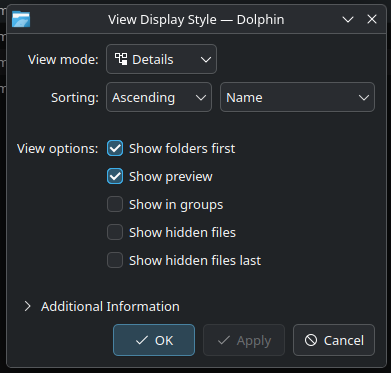
these are my view settings, not sure where to change to list viewalso found this:

so it is a special setting to open files anywhere… not looking good for RMB (but it explains why it is different from LMB)The view mode, but never mind you found the option for this behaviour
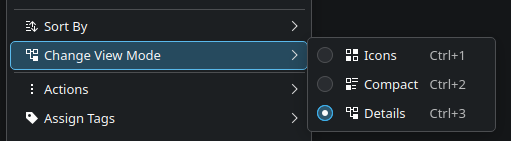
there’s no list option for me…I guess they are thinking about the ‘Compact’ option
Yeah I was thinking it would shrink the clickable area.
I haven’t used dolphin in forever though, I’m probably past being helpful
compact just gets rid of the empty space
For me, left clicking on the empty space doesn’t select it. So there must be settings around this stuff.
the setting is here:

Actually, left clicking opens for me it doesn’t select. Are you using the double click to open setting?
In my single click to open scenario, I either select by clicking on the plus that appears on the icon on hover, or by clicking and dragging to create a select box (which also requires covering the name, not just empty space).
In configure dolphin->view->details there is a radio button choice between opening files by clicking anywhere on the row or clicking on icon or name. I tried changing it to anywhere but this did not appear to work, I still need to couch in the name.
Are you using the double click to open setting?
yes, double click to open
The single vs double click setting is actually not in dolphin config but in plasma settings, general behavior. Not sure if something else in there might influence the behavior you are getting.