

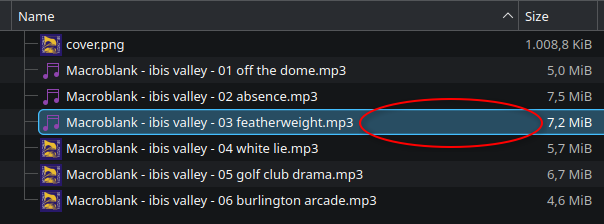
i want to be able to delete a file without having to select it first with LMB. this is because i can only select it with RMB when i click on the file name, whereas i am able to select the file with LMB even in the empty space after the filename.
this may not look like an issue in this example but i have a lot of files that are only 3 characters long plus file extension so most of the line is empty space. furthermore i don’t understand why the behavior is different in the first place.
is there a setting for this?
edit: dolphin v25.12.3
Actually, left clicking opens for me it doesn’t select. Are you using the double click to open setting?
In my single click to open scenario, I either select by clicking on the plus that appears on the icon on hover, or by clicking and dragging to create a select box (which also requires covering the name, not just empty space).
In configure dolphin->view->details there is a radio button choice between opening files by clicking anywhere on the row or clicking on icon or name. I tried changing it to anywhere but this did not appear to work, I still need to couch in the name.
yes, double click to open
The single vs double click setting is actually not in dolphin config but in plasma settings, general behavior. Not sure if something else in there might influence the behavior you are getting.