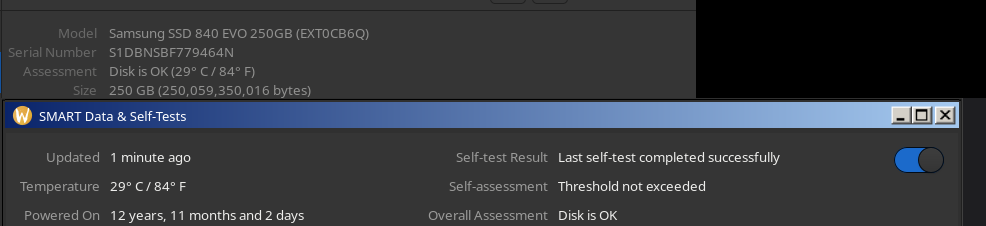
12 years and 11 months of powered-on time for this SSD… I should definitely turn it on for another month lol
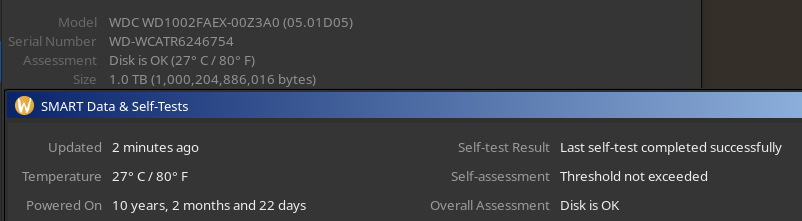
10 years powered-on time for this HDD. Who says HDDs aren’t reliable? 😂
Anyone got better numbers than these?
Power_On_Hours_and_Msec 0x0032 000 100 000 Old_age Always - 46892h+00m+00.000s
Power_On_Hours 0x0032 042 042 000 Old_age Always - 50812
Power_On_Hours 0x0032 044 044 000 Old_age Always - 49082
some of my higher ones… ~6 years continous
I don’t understand this whole thing about years of uptime. Don’t you ever get system/security/kernel updates that require a reboot?
This isn’t about continued uptime. It’s total time on. Rebooting doesn’t reset this figure.
I just had to replace a 4tb drive with a mfgyr of 2016 from a customer’s Synology box.
I couldn’t get SMART data off it because it wouldn’t initialize to do a test, but the thing was damn reliable right up until it went kaput.
About the only thing I have in that range would be an old Connor CP30174E from the 90’s. It doesn’t get any use tho. I framed in in a shadow box for display along with some other drives that I disassembled and display as a curio. I just think they’re neat.
root@kamidake:~# for i in /dev/sd? ; do echo $i; smartctl -a $i |grep Hours| awk ’ { print $10/8760}'; done
/dev/sda
15.6055
/dev/sdb
15.6979
/dev/sdc
6.04909
/dev/sdd
7.35708
/dev/sde
10.618
/dev/sdf
7.28071
/dev/sdg
10.5689
/dev/sdh
10.6264
/dev/sdi
2.28311
/dev/sdj
10.7498
/dev/sdk
10.5832
/dev/sdl
7.35502
/dev/sdm
10.643
/dev/sdn
10.8016
/dev/sdo
10.7558
/dev/sdp
9.11416
root@kamidake:~#
These are running ZFS and I have 2 other boxes with similar, most in the 10-12 year range. Spinning drives.
Good stuff.
$ sudo smartctl -A /dev/sda -f brief | grep -i power_on 9 Power_On_Hours -O--CK 001 001 000 - 120198 $About a decade ago, I did some contract work for a local credit union upgrading some of their systems and one of their secondary servers had an old Maxtor drive that had over 31 years of uptime on it. It was wild because at the time, that drive had been running constantly longer than I had been alive.
I have a 128mb maxor drive in my hardware closet. Works fine, just old.
Right on. One of the first computer parts I ever owned personally was a 40GB Maxtor drive, right before or around the time Seagate bought them. I can’t remember how it happened, but at some point the raw drive was dropped down a flight of stairs. Worked just fine for several more years before finally failing.
I just hope you’ve got backups 🙂
Seriously though, we found an old Dell server at work that hadn’t been rebooted for years.
We knew that it was fine whilst it was running, but the stress of a reboot would finish it off with all those POST fan speed tests, RAID array tests, etc.
We took as much data off it that we thought might be relevant and rebooted it.
1 drive failed immediately. 1 fan must’ve had all the dust as that blew out a cloud during the fullspeed test.
A few days later more drives started failing and it just gradually died.
It was actually a sad day when we powered it off for the last time. 🥲
It was actually a sad day when we powered it off for the last time
No, it died not from the reboot.
It died because it’s life had no meaning anymore, after you had taken all the workload off it.
/s
No screenshots, but I had an old server with a pair of mirrored 8GB Seagates hosting a particularly specialized service on a very beefy and regularly maintained UPS and it had a server uptime of 21 years (had not been rebooted since somewhere around 1999) when I finally decommissioned it about 5 years ago, both disks would’ve been the same. It was on the public internet the whole time too, running Debian Slink with kernel 2.0.36, which had been awkwardly patched and rebuilt somehow to make the service (itself already obsolete at that time) actually work. I don’t know why I remember all this, but I do.
I do remember monitoring the SMART status at various points and the drive bearings must’ve been pretty cooked because those two drives were always running at 50-60C and I had a big old box fan pointed at the thing with the side panel off.
This example is also why I don’t always buy into the cult of “you must always regularly update all software immediately all the time”. Old software is not always bad software, same with old hardware. Sometimes it’s genuinely possible to have a bulletproof system. The problem is you never really know you do, until it either enters survivorship bias or becomes catastrophically proven otherwise. But you can make educated guesses, and if you’re going to naively assume that your old software must have exploitable security holes it seems equally naive to me to assume that updates must never have exploitable security holes. I think the risk calculus has to be done on a case-by-case basis.
Are you me?
This is the exact argument I make about updating.
Without knowing, you’re just trading known risks for unknown risks.
Known risks can be managed.
My opinion of the constant update cycle today: it rationalizes management’s liability offloading while also justifying staffing requirements and therefore budget.
Liability and risk are related, but very different things.
I’ve got 12 years and 5 months on a Western Digital WD20EARX HDD. It’s starting to get some bad sectors.

I’ve got a similar runtime on a SAMSUNG SpinPoint F2 and it still seems to be healthy. There’s nothing important on either of them, I just want to see how long they will last.
smartctl --scan | awk '{print $1}' | xargs -I {} sh -c 'echo -n "{}: "; smartctl -A {} | awk "/Power_On_Hours/ {printf \"%.2f years\n\", \$10/8760}"'/dev/sda: 0.30 years #14TB WD Elements (shucked) /dev/sdb: 2.64 years #8TB WD My Book (shucked) /dev/sdc: 12.37 years #3TB WD Red /dev/sdd: 2.86 years #12TB My Book (shucked) /dev/sde: 13.47 years #3TB WD Red /dev/sdf: 1.26 years #14TB WD Elements (shucked) /dev/sdg: 10.55 years #5TB WD RedMost of these drives served on Windows Server bare metal w/ StableBit DrivePool + SnapRAID before migrating to Proxmox mergerfs + SnapRAID & ZFS. My raidz1 pool has a combine total of 36+ years lol. Yes I do have backups. :)
13.47 years on spinning rust, very nice!